
Michigan DNR Hunt Fish
State of MichiganSports
3.6129.00 Reviews
- Version
- 1.2026.0729.1
- Installs
- 100.00K
- Age Rating
- Everyone
Screenshots
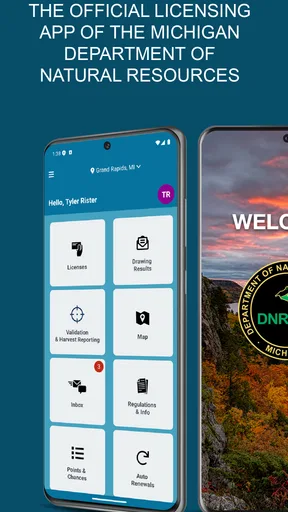
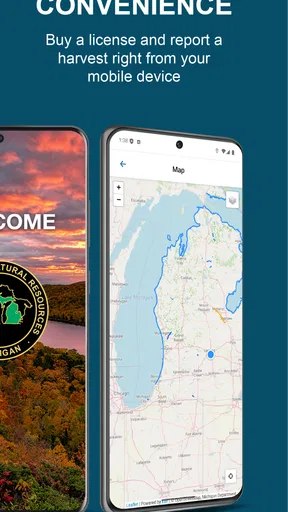
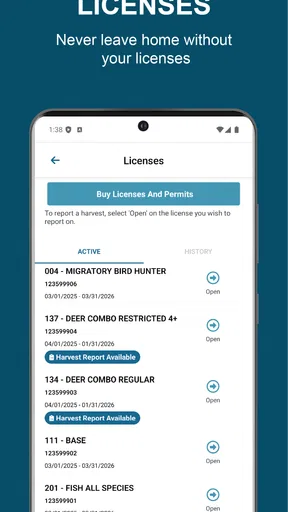
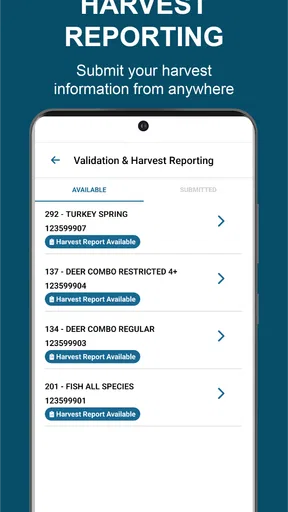
Our Review of Michigan DNR Hunt Fish
 Analysis by Appyee
I approached Michigan DNR Hunt Fish as a practical companion for people who spend time outdoors in Michigan and need access to official hunting and fishing licensing information from a phone. It is a free sports app from the State of Michigan, aimed at a very specific audience rather than casual users looking for general outdoor entertainment. My overall impression is that its value depends less on flashy presentation and more on whether it fits the moments when you are preparing for, traveling to, or taking part in an outdoor activity.
The most important thing to understand is its official role. This is the licensing app of the Michigan Department of Natural Resources, so I would treat it as a focused administrative tool for Michigan hunters and anglers. It is not a broad trail-discovery app, a social fishing community, or a replacement for every outdoor reference you may carry. That narrow purpose is also its main strength: when your task is connected to Michigan DNR licensing, a dedicated state app makes more sense than trying to piece information together from unrelated services.
How Michigan DNR Hunt Fish fits into real outdoor routines
I find the app most useful when I treat it as one planned step in an outing, rather than something to sort out at the last minute. Thinking through the routine—from getting ready at home to checking what I need on the way—helps show where a phone-based licensing tool saves effort and where a little preparation still matters. That makes the next part easier to judge: how it fits alongside the other tools I rely on outdoors.
Useful before leaving home, less predictable when the signal changes
Connectivity shapes the experience from the beginning. Before heading out, I would use the app while connected to a reliable network, when there is enough time to sign in, review the relevant licensing information, and resolve any account or transaction friction without standing beside a boat launch or preparing to enter the woods. That preparation step matters because outdoor locations do not always offer the same dependable mobile connection as a kitchen table or office.
A realistic example is an early fishing trip. The night before, I would open the app, make sure the licensing task I need is complete, and check that the information I expect to use is easy to reach. In the morning, the phone can then serve as a quick reference rather than becoming the center of the preparation process. This is a small change in routine, but it reduces the chance of discovering a login or network problem when the group is already waiting.
The app’s official connection is especially useful in that preparation stage. Instead of relying on a search result that leads to an old page, a forum post, or a third-party explanation, I can start with the State of Michigan’s own licensing channel. That does not remove the need to read rules carefully, but it gives the process a more appropriate home for Michigan-specific licensing tasks.
There is a trade-off. A focused licensing app is not automatically the best tool for every question that comes up outdoors. If I want broad weather planning, detailed navigation, species identification, or community reports from a particular lake, I would still use services designed for those jobs. Michigan DNR Hunt Fish makes more sense as one part of a preparation kit than as the only app on an outdoor trip.
Why a phone-based licensing tool helps in mobile contexts
The strongest everyday use case is mobility. A phone is already likely to be with me when I am driving to a launch, meeting other people, or moving between preparation points. Keeping a state licensing service in that same device is more convenient than treating licensing as a separate paper-heavy chore or searching through a general website every time I need to revisit it.
I also like the possibility of separating “planning at home” from “checking while moving.” At home, I can take my time and use a stable connection. On the road or near the water, I want shorter interactions: open the app, locate the relevant licensing area, and confirm what I need without navigating through several unrelated pages. That workflow is where a dedicated app can feel more natural than a browser, provided the connection and account session cooperate.
Still, phone convenience should not be confused with universal availability. A mobile app is only helpful in the moment if the device has power, the account is accessible, and the network can handle the request. I would not make the app my only preparation method for a remote outing. I would complete important steps earlier, keep essential details organized, and avoid assuming that a weak-signal location will behave like a connected urban area.
This is also why I would recommend it more strongly to regular Michigan hunters and anglers than to visitors who only need general outdoor ideas. For a resident or frequent participant, a dedicated state tool can become part of a repeatable routine. For someone passing through and looking for a one-time overview, a broader official information source may be easier to explore first, with the app used when the licensing task becomes specific.
What happens when connectivity or the session fails?
The most important limitation is not necessarily a missing feature; it is the uncertainty that comes with doing an online administrative task in a place where coverage may be uneven. If a page takes too long to load, a session expires, or a transaction does not complete cleanly, the worst response is to keep tapping and assume the result will sort itself out. I would pause, check whether the action visibly succeeded, and avoid repeating a purchase or submission until I understand the status.
My preferred recovery routine would be simple. First, return to a stronger connection rather than troubleshooting beside the water. Next, reopen the app and look for the current account or licensing status. If the result is still unclear, I would use the official support or information route associated with the State of Michigan instead of relying on a random online answer. The app is valuable because it belongs to an official channel, so recovery should stay within that channel.
There is another practical lesson here: do not wait until the final minutes before an outing. A licensing app can shorten the process, but it cannot guarantee that every network, device, or account state will cooperate at the exact time you need it. Completing the important step in advance gives you room to respond if the app needs an update, the connection drops, or your login requires attention.
I would also keep the phone’s basic condition in mind. Cold weather, low battery, glare, wet hands, and a crowded launch area can all make a quick digital task more awkward. Those are not flaws unique to this app, but they change how useful a phone-based licensing workflow feels. The best experience comes from treating the app as preparation and confirmation, not as something to improvise under pressure.
Using it without wasting mobile data
Because licensing tasks are usually easier to manage on a stable connection, I would use home or trusted Wi-Fi for setup, account work, and any process that involves several screens. That approach is sensible for anyone with a limited mobile plan, and it also makes the experience calmer. A reliable connection reduces the temptation to reload repeatedly when a page is slow.
When I am away from Wi-Fi, I would open the app only for the specific task I need rather than browsing aimlessly. I would also avoid updating the app immediately before leaving unless I have enough time to confirm that the new version opens correctly. The current version is 1.2026.0729.1, and the app supports Android 7.0 or later, so older devices may still be relevant to some users, but compatibility alone does not guarantee a smooth field experience.
It is worth checking the app before a trip rather than assuming that an installation from months ago will be ready. I would confirm that it launches, that I can reach the relevant account area, and that the phone has enough storage and battery for normal use. This is not exciting advice, but it is more useful than discovering a problem after driving to a remote location.
I would not describe the app as a substitute for planning around connectivity. The sensible approach is to complete network-dependent work while connected and then carry a clear understanding of what has already been done. If I need a definitive licensing detail during an outing, I would prefer to have reviewed it beforehand rather than depending on a last-minute request over a marginal signal.
Where it compares well with usual alternatives
The usual alternative is a mobile browser pointed at a government website. A browser can be more flexible for exploring a wide range of Michigan DNR information, especially when I am researching regulations, seasons, locations, or related outdoor topics. It may also be better when I do not yet know exactly which licensing task I need. The dedicated app, by contrast, is more focused and can feel more natural when licensing is the main objective.
Another alternative is handling the process in person or keeping a paper record. That can be reassuring for people who dislike mobile administration, and a physical backup may still be sensible for a trip. However, paper does not provide the same convenient connection to a current state-managed account or licensing workflow. The app’s advantage is not that it eliminates every other method; it is that it puts the official mobile route close at hand.
General outdoor apps have a different purpose. They may offer maps, forecasts, navigation, catch logs, or social reports, but those features do not make them a better choice for Michigan DNR licensing. I would use them alongside this app rather than expecting one product to cover every part of an outdoor day. The more specialized the task, the more reasonable the dedicated tool becomes.
The app is less compelling for someone who never hunts or fishes in Michigan. Its category is sports, but that label should not lead a casual sports fan to expect scores, training plans, or recreational competition. The audience is clearly tied to Michigan outdoor licensing, and people outside that use case should skip the download unless they have a specific reason to interact with the state’s hunting and fishing system.
Audience, maturity, and the practical value of adoption
The app is free and rated for Everyone, which makes the basic barrier to trying it low. It has passed the early experimental stage of a new release, having first appeared on Jul 15, 2022, and its current version shows that it continues to receive version updates. That combination makes it reasonable to install before a planned Michigan outdoor activity rather than dismissing it as a temporary experiment.
Its adoption also suggests that it is not an obscure tool: the app has over 100 thousand installs. At the same time, its average rating is 3.5 from around 210 ratings, with 124 written reviews. I read that as a reason to keep expectations measured. The app is useful for a defined job, but the rating does not suggest that every user finds the experience effortless. The likely friction points for any licensing app—account access, network timing, and the seriousness of getting a transaction right—deserve attention.
I would recommend it to Michigan residents who hunt or fish regularly, families preparing for a trip, and anyone who wants the state’s licensing route available on a phone. I would be more cautious with users who need rich offline field tools, detailed navigation, or a single app for every outdoor activity. Those people may still install it, but they should pair it with tools designed for maps, weather, and trip safety.
My connectivity verdict
After considering how it fits into an actual outing, I see Michigan DNR Hunt Fish as a useful official utility rather than an all-purpose outdoor companion. Its best moment is before departure, when I have a dependable connection and enough time to handle licensing carefully. Its weakest moment is an urgent request from a remote location where the signal, battery, or account session is unreliable.
My practical recommendation is to use the app early, while connected, and treat field access as a convenience rather than a guarantee. That single habit addresses most of the connectivity concerns without taking away the benefit of having a state licensing tool on the phone. I would also keep a backup understanding of my completed steps and avoid repeating an action when the result is unclear.
For the right user, the app earns its place because it connects a Michigan-specific administrative need with a device that is already part of everyday travel. It will not replace a map app, a weather service, or careful reading of outdoor rules, and people who want those broader features should look elsewhere. But if your priority is managing Michigan hunting or fishing licensing through an official mobile channel, Michigan DNR Hunt Fish is a sensible free starting point, especially when you prepare at home and respect the limits of connectivity in the field.
Privacy and Permissions
See what permissions an app requests and how it handles your data.
- Identity
- find accounts on the device
- Contacts
- find accounts on the device
- Location
- approximate location (network-based), precise location (GPS and network-based)
- Photos/Media/Files
- read the contents of your USB storage, modify or delete the contents of your USB storage
- Storage
- read the contents of your USB storage, modify or delete the contents of your USB storage
- Camera
- take pictures and videos
- Wi-Fi connection information
- view Wi-Fi connections
- Other
- view network connections, change network connectivity, connect and disconnect from Wi-Fi, full network access, run at startup, prevent device from sleeping
Verdict
Strengths of Michigan DNR Hunt Fish
- Official Michigan DNR information from a trusted source
- Useful license details for hunting and fishing activities
- Helps users check regulations before heading outdoors
- Includes access to seasonal and wildlife-related updates
- Convenient mobile access while traveling across Michigan
Limitations of Michigan DNR Hunt Fish
- Some features may require an internet connection in remote areas
- The interface can feel dense for first-time users
- Information may be difficult to navigate during busy seasons
- Not all outdoor planning tools are available in one place
- Users must keep regulations updated as rules can change
Other Releases by State of Michigan
View All
MiChildSupport
Parenting4.1
Similar Picks in This Category
View All
BeSoccer: Soccer Live Score
BeSoccer apps4.3

Cricbuzz - Live Cricket Scores
Cricbuzz.com3.7

NFL
NFL Enterprises LLC2.4

Da Fit
MO YOUNG LIMITED3.6

ESPN
Disney4.5

LiveScore: Live Sports Scores
LiveScore Limited4.5
Frequently Asked Questions
What is Michigan DNR Hunt Fish used for?
Michigan DNR Hunt Fish is the official mobile companion for Michigan hunters and anglers. After installing it, users can review hunting and fishing regulations, check season dates, find license and permit information, view maps and locations, and access useful outdoor resources. It is designed to keep important Michigan Department of Natural Resources information available while planning trips or spending time outdoors.
Can I buy hunting or fishing licenses through Michigan DNR Hunt Fish?
The app provides access to Michigan license, permit, and registration services, but the exact purchasing process may depend on the product you need and the current DNR system. Some transactions may open an online service or require an account and payment details. Before relying on the app in the field, confirm that your license has been successfully issued and keep any required documentation accessible.
Does the app work without an internet connection?
Some information may remain available after it has been loaded, but users should not assume that every feature works offline. Maps, regulations, account services, license purchases, and other live content may require mobile data or Wi-Fi. It is best to open the app before leaving home, review the relevant rules, save important details where possible, and avoid depending on a weak signal during a hunt or fishing trip.
What information can I find about Michigan hunting and fishing regulations?
The app is useful for checking current Michigan DNR rules, including season dates, species requirements, bag limits, license details, and other restrictions. Regulations can vary by location, species, and time of year, so users should select the correct activity and area rather than relying on memory. Always read the complete official regulation information, especially when rules have recently changed.
Is Michigan DNR Hunt Fish free, and which devices support it?
Michigan DNR Hunt Fish is generally available as a free download for compatible Android and iOS devices, although normal mobile data charges may apply. Some services accessed through the app, such as licenses, permits, or reservations, can involve separate fees. Availability, required operating-system versions, and supported features may change, so check the official Google Play or App Store listing before downloading.
